How to choose HR software: five steps to the right HR case management system

Your HR team needs more than another inbox. A practical guide to choosing HR case management software that supports your people and the work behind them.
A payroll question arrives by email. A manager calls about performance concerns. An employee raises a complaint that needs careful handling.
By lunchtime, your HR team is managing three very different situations across a collection of messages, documents and reminders. The spreadsheet remains admirably calm. It has not heard about half of them.
If this sounds familiar, the question is where technology could make the most useful difference.
If you are working out how to choose HR software for this kind of work, the category matters. Choosing HR case management software starts with understanding the work your team needs to manage, from routine requests to sensitive employee matters.
Types of HR software, and where case management fits
Most HR teams already run several HR systems. The main types of HR software are:
- Core HR system: a human resource information system (HRIS) or human resource management system (HRMS) holds employee data such as personal details, job titles and reporting lines, often with employee self service so people can update their own details.
- Applicant tracking system (ATS): manages recruitment from job posting to hire.
- Workforce management software: scheduling, time and attendance.
- Human capital management (HCM) platform: a broader suite that adds payroll, benefits, recruiting and talent modules to core HR functions.
- Performance management software: goal setting, reviews and feedback tools.
- HR case management software: the requests, cases and sensitive employee matters that need ownership, restricted access, actions and a record of decisions.
Each type solves a different problem. This guide focuses on the last one: the HR tasks and HR workflows that arrive as requests and cases.
Used well, the right HR tools cut repetitive administrative tasks, keep employee information in one place and give HR managers a clearer view of HR operations.
Here are five steps to finding a system that fits.
1. Identify where HR work becomes difficult
Before comparing any HR platform, map your current HR processes. Start with a recent week.
What came in? Through which channels? Who picked it up? What needed follow-up? Which situations required several people to coordinate?
Look at the experience from both sides.
For employees and managers:
- Is it clear where to ask for help?
- Do they know whether a request has been received?
- Are they repeatedly explaining the same situation?
- Can they provide information privately and appropriately?
For HR:
- Is ownership clear?
- Can the team distinguish routine requests from urgent concerns?
- Are important actions and dates visible?
- Can colleagues find the history when someone is away?
- Does preparing a report require detective work?
Choose the problems with the greatest effect on service, workload or risk.
Start with a short statement of what needs to improve and who will benefit.
2. Define the work the system must support
An employee enquiry and a workplace investigation need different handling.
A routine request may need straightforward allocation and a quick response. A sensitive case may involve restricted records, several participants, evidence, interviews, decisions and follow-up over a longer period.
Your evaluation should reflect both.
Map a few common workflows, such as:
- A payroll correction.
- A policy enquiry.
- A performance management process.
- A workplace complaint.
- An employee relations case requiring an investigation.
For each, identify the information, participants, permissions, actions and reporting needed.
Then consider how the proposed system fits with your existing HR technology, such as your core HR system. Where your HRIS already holds employee data and records or manages a process, identify what should remain there and what information needs to pass between systems.
Ask providers to demonstrate the relevant connections. Establish whether they are available now, configurable, or dependent on a separate integration project.
Build a clear scope for the work, records and handovers the new system will manage.
Turn that scope into a short requirements list of must-have and nice-to-have features to guide the evaluation process.
3. Make confidentiality and responsible AI part of the shortlist
HR records can contain deeply personal information. Access should reflect the sensitivity of the case and each person’s role.
Use practical scenarios to test this:
- A manager submits a concern but should not see HR’s internal assessment.
- A complaint involves someone who would normally oversee the case.
- An investigator needs access to selected information.
- A case is reassigned while its owner is away.
- A leader needs an overview without unnecessary personal details.
Ask how access is granted, reviewed and removed. Look closely at data security. Examine audit history, authentication, retention options and data export arrangements. Bring IT, security and privacy colleagues into the evaluation.
Apply the same scrutiny to artificial intelligence (AI).
Ask which functions are available, what information they process, how permissions apply and whether customer data is used for training. Test whether summaries accurately represent the underlying records and distinguish allegations, findings and unresolved questions.
Human review should be explicit wherever AI assists with sensitive case material. An elegant summary still needs to be checked.
Set clear expectations for confidentiality, evidence and accountable judgement.
4. Test the employee experience and the HR workload
Invite a small group of HR practitioners, managers and appropriate business stakeholders to assess the shortlisted systems.
Give providers two fictional scenarios: a routine request and a sensitive employee matter.
Follow each from submission through to closure. Ask:
- Is the form understandable?
- Does it collect enough information without becoming an interrogation?
- How is the work allocated?
- What can the employee or manager see?
- How are actions, documents and communications recorded?
- Can a routine request be escalated when its circumstances change?
- How does another HR colleague take over?
- What follow-up remains visible after closure?
Test reporting as well. Ask to see workload, ageing cases, overdue actions, request types and outcomes. Check whether access restrictions also apply to reports and exports.
Record how much effort each task takes. A system that requires constant administrative attention deserves a careful second look.
Choose evidence from realistic use over confidence created by a presentation.
Key features to look for in HR case management software
- Clear intake for employees and managers, with confirmation that a request has been received.
- Allocation and ownership, so routine requests and urgent concerns are handled differently.
- Access that reflects the sensitivity of each case and each person’s role, reviewed and removed when roles change.
- An audit history of actions, documents and communications.
- Workflows that let a routine request be escalated when its circumstances change.
- Reporting on workload, ageing cases and overdue actions, with the same access restrictions.
- Connections to your HRIS, so employee data is not entered twice.
- AI features with explicit human review.
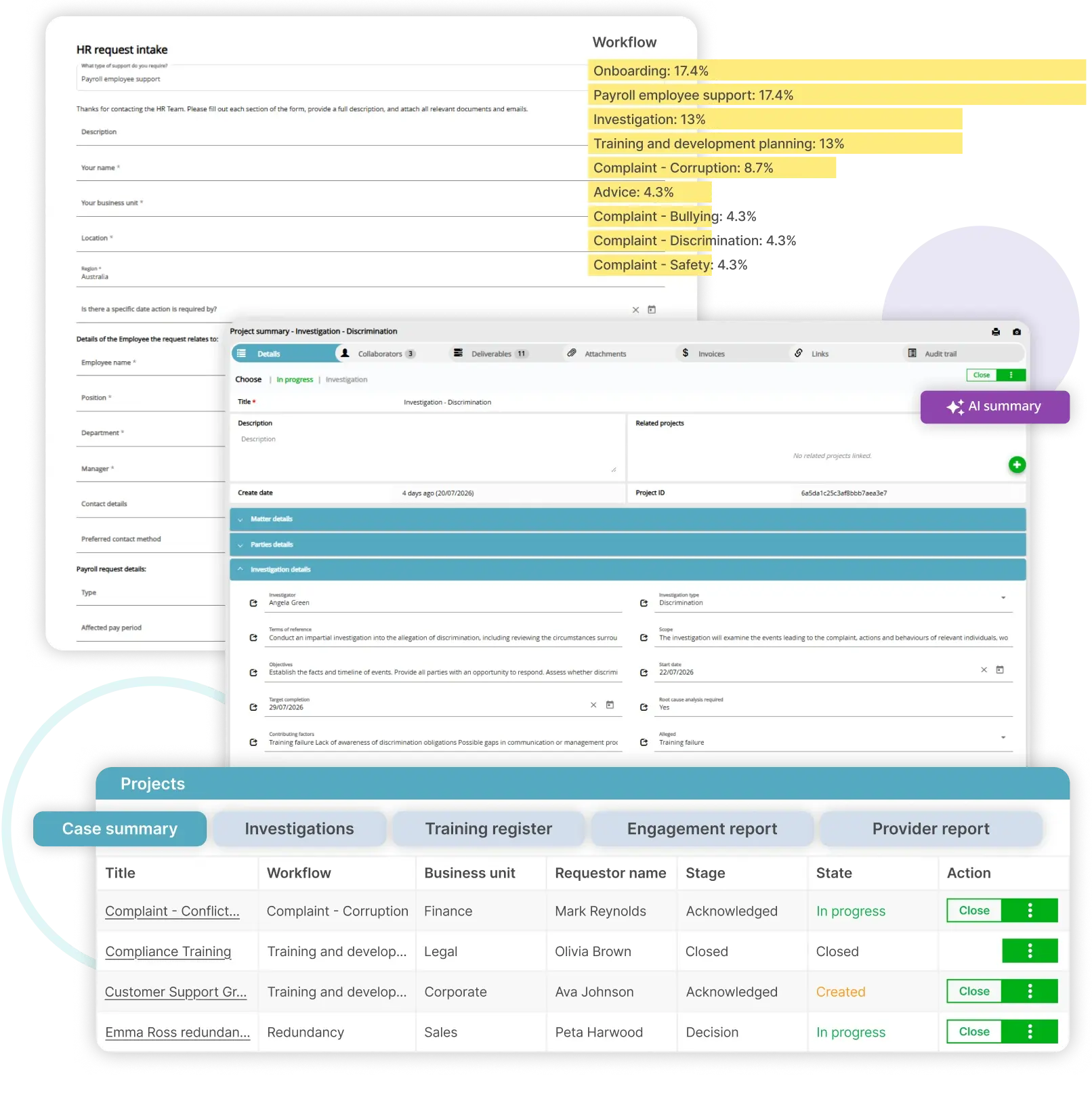
Dazychain HR: an intake form, an investigation case and the case list.
5. Plan a manageable launch and measure the result
Before making the decision, compare the complete proposal: software, configuration, migration, integrations, training, support and ongoing administration.
Clarify how pricing works. Establish which users, employee groups, modules, storage and AI usage are included, and what changes the price.
Then agree on a first phase that solves a meaningful problem. This might be HR enquiries and payroll requests, or a defined employee relations workflow.
Specify:
- Who owns the process and system.
- Which records will be migrated and checked.
- How permissions will be approved.
- What training each group needs.
- How employees and managers will learn where to go.
- What support is available during launch.
- How success will be reviewed.
Useful measures include the proportion of work captured, time to allocation, overdue actions, reporting effort and employee or manager feedback.
Interpret the measures carefully. A sensitive matter may need time for a thorough process. Review timeliness alongside the quality and completeness of the work.
The right HR software should give HR a clearer view of its responsibilities and employees a more dependable way to get help.
Other factors in choosing the right HR software
The five steps above focus on the work. Before you sign, weigh five more factors that affect how well any HR platform performs over time.
Company size and scalability
Consider the size of your organisation today and how your workforce may change. Ask how the HR platform handles more employees, more locations, more HR managers and new workflows, and how the price changes as you grow. Choosing the right HR software means balancing today’s operational needs with long-term goals.
User experience and adoption
User experience decides whether people use the system. If forms and screens are hard to follow, employees and managers go back to email, and HR professionals end up re-entering employee information by hand. Look for an intuitive interface, clear employee self service for raising requests, and fewer repetitive tasks for the HR team.
Total cost of ownership
The subscription fee is only part of the cost. Add implementation, configuration, data migration, integrations, training, support and the time your team will spend on ongoing administration. Compare HR platforms on the full cost over several years, not the first-year price.
Vendor reputation and support
Check the reputation and reliability of each vendor. Ask for references from organisations similar to yours, ask how product updates are delivered, and confirm what support is available after launch.
Legal and regulatory requirements
HR records are subject to legal and regulatory requirements, such as privacy law and record retention obligations. Check how each HR platform’s access, retention and export settings match your obligations, and bring legal or privacy colleagues into the evaluation process.
Frequently asked questions
How do you choose HR software?
Start with the work, not the feature list. Identify where HR work becomes difficult, define the workflows the system must support, test confidentiality and AI, run realistic scenarios with HR professionals and managers, then plan a manageable first phase and measure the result.
What is the difference between an HRIS and HR case management software?
An HRIS holds employee data and core HR records. HR case management software manages the requests, cases and sensitive employee matters that need ownership, restricted access, actions and a record of decisions. Many HR teams use both, with information passing between them.
What questions should you ask HR software vendors?
Ask how access is granted, reviewed and removed. Ask which integrations are available now, which are configurable, and which need a separate project. Ask how AI features process information and whether customer data is used for training. And ask what the full price includes, and what changes it.
What software is best for an HR department?
It depends on the work. Most HR departments need a core HR system for employee data, plus specialist tools for specific work, such as performance management software or HR case management software. If your team manages requests, complaints or employee relations cases, assess HR case management software alongside your HRIS.
What are the main types of HR software?
The main types are core HR systems (HRIS or HRMS) for employee data, human capital management (HCM) platforms, applicant tracking systems for recruitment, workforce management software for scheduling and attendance, performance management software, and HR case management software for requests, cases and employee relations matters.
Give every employee matter a clear path forward
Dazychain HR helps teams capture requests, manage cases, coordinate workflows, keep documents connected and report on their work.
Whether you are improving everyday HR service or bringing more structure to employee relations casework, we can explore a practical starting point with your team.
Bring the workflow that currently causes the most chasing. We can start there.
Please book a time here.