Dazychain Implementation
A practical implementation process designed to get your team working quickly
Dazychain implementation is designed to be clear, guided and practical. We work with your team to understand how you manage work today, what you want to improve, what data you need for reporting, what workflows matter most and how Dazychain should be configured to support your Legal, HR, Compliance, Risk or Governance team.
The goal is simple: help your team launch a best-practice Dazychain workspace that is easy to understand, quick to embed and ready to support real work.
Dazychain is configurable, so your implementation focuses on the way your team actually works: intake, triage, matter types, case types, workflows, documents, user groups, permissions, reporting, integrations, training, and support.
Implementation overview
Why implementation matters
A guided configuration, not a heavy transformation
Dazychain implementation is not designed to be intimidating. The process focuses on helping teams “get it” quickly, with a best-practice setup that can evolve over time. Dazychain’s objective is to create a setup that is quick to embed and easy to use, with training and post-launch support helping Dazychain become part of the team’s working life. We encourage input from each member of the team to ensure early buy-in.
Because Dazychain is configurable, changes and updates can be made as the organization evolves.
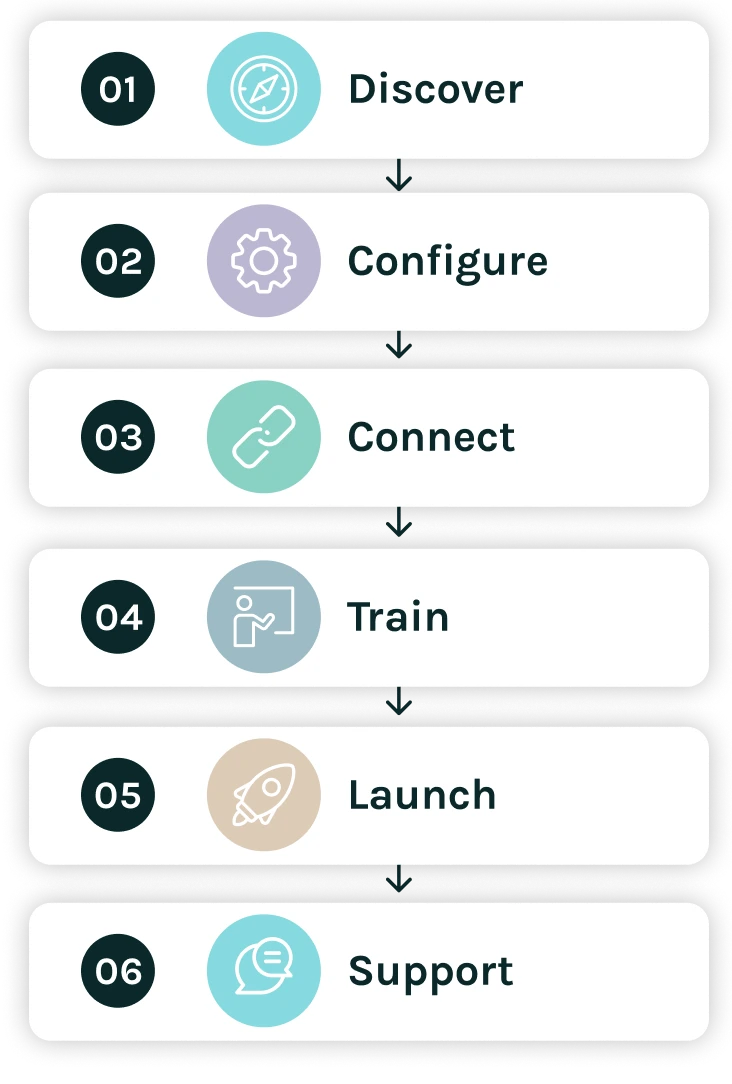
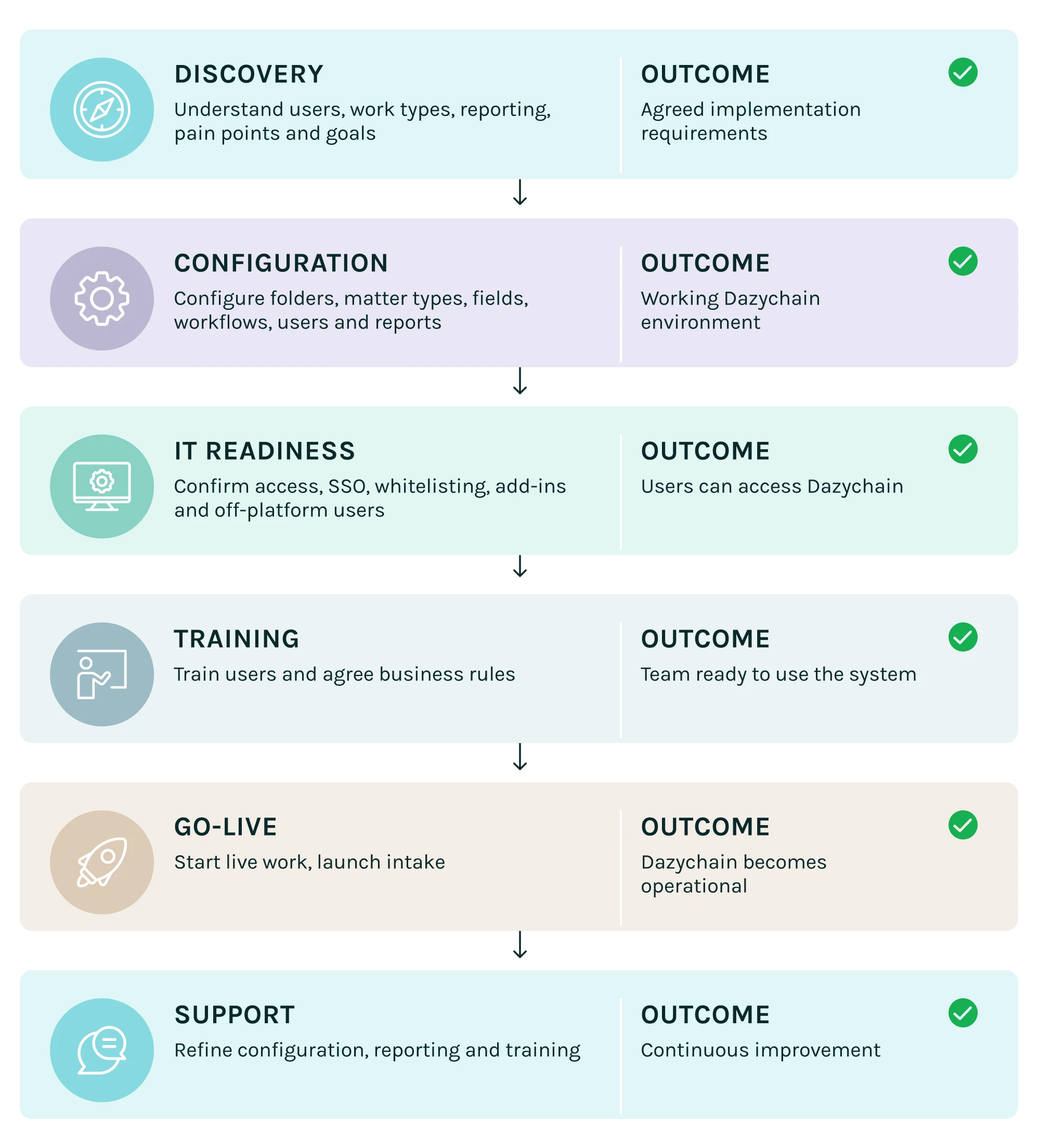
Typical implementation timeline
A shared project plan and implementation configuration overview ensure you understand the current status of the implementation project at any time.
PHASE 1
Discovery
Understand your team, work and goals
Discovery is where we learn how your team works today and what you want Dazychain to improve. This may include:
Discovery questions may include
Outcome of discovery: At the end of discovery, Dazychain and the customer have a clearer view of how the platform should be configured. This becomes the foundation for configuration.
PHASE 2
Configuration
Configure Dazychain around your work
Dazychain configuration translates discovery into a working platform. The collaborative configuration document shows the agreed setup, and may include folder structures, matter/project types, matter details templates, risk ratings, document types, document detail templates, document statuses, intake form settings, groups and user roles depending on your requirements.
What can be configured
Folder structure
Folders can group projects or matters by organisational structure, business unit, region or work type or any other designation. Folders are used to store projects, group like projects together and can be changed, deleted or added to over time.
Matter or project types
Matter types define the broad categories of work your team manages.
Matter detail fields
Matter detail fields capture the information needed for reporting and management. More data in the template enables more detailed reporting, but also increases the amount of information users need to complete.
Risk ratings
Risk ratings help teams classify, prioritise and report on matters. The business rules documents also show examples of risk categorisation using high, medium and low measures for urgency, strategic importance, reputational risk and effort.
Document and deliverable types
Document and deliverable types help teams classify the work products connected to matters.
Document statuses
Document statuses enable teams to track and report on progress more granularly.
Intake forms
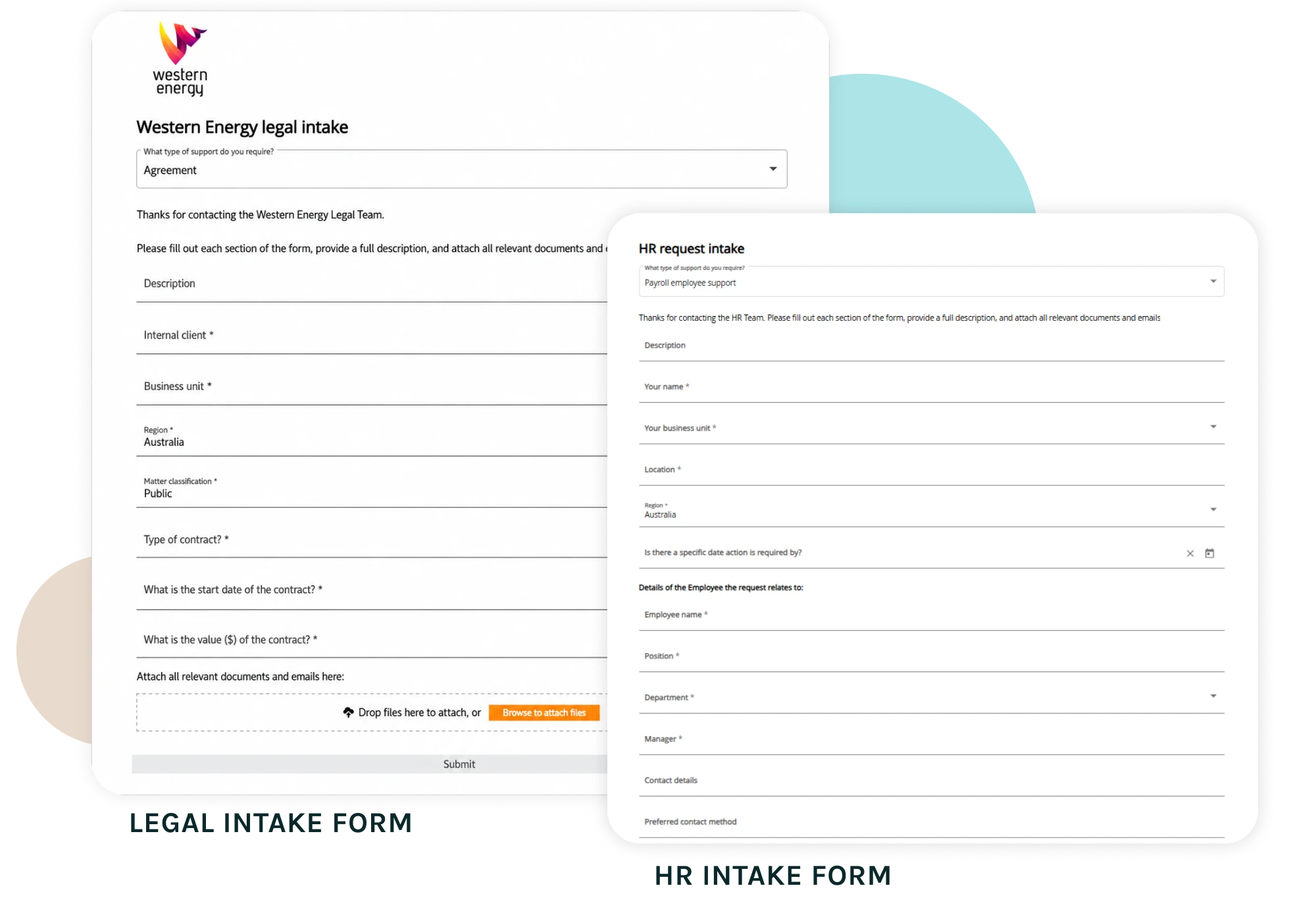
Dazychain intake forms can be configured to capture the information needed from internal clients or employees. Each workflow can be directed to a folder and assigned to an owner or manager. Mandatory creation fields are included on the form, and field labels can be renamed for clearer user context, such as changing “Internal client” to “Your name”.
Groups and roles
Groups help categorise work teams and manage collaboration. Roles and permissions help ensure users have the right access. For Legal and HR, this is particularly important for confidential matters, privileged matters, employee relations cases, protected disclosures and investigations.
Outcome of configuration
At the end of configuration, the customer has a working Dazychain environment aligned to their agreed requirements, with example matters, reports and workflows ready for review.
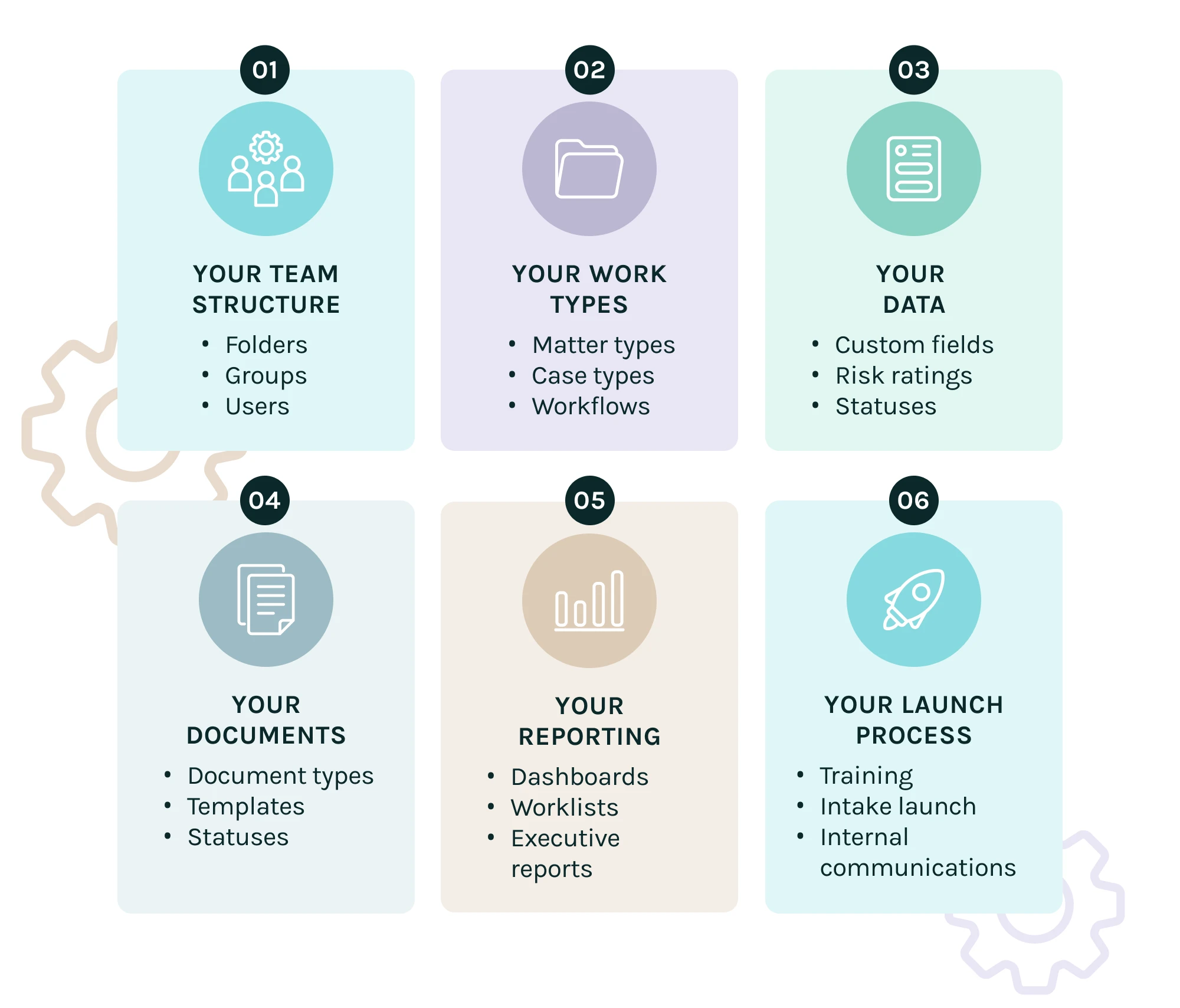
A modular configuration diagram: your team structure, work types, data, documents, reporting and launch process.
PHASE 3
IT readiness and integrations
Prepare the technical environment
Before launch, IT readiness needs to be addressed. An IT checklist identifies key readiness items including:
The checklist explains that whitelisting helps ensure access and functionality are not blocked, Outlook add-in permissions enable users to access the Dazychain add-in and file emails, off-platform users may access features such as intake forms, contract automation and My Portal, and SSO configuration is completed collaboratively.
Common IT activities
Integrations during implementation
Current Dazychain integrations may include Gmail, Outlook, Microsoft Word, and DocuSign, depending on the customer’s configuration and licensed capabilities. For HRIS and HCM systems, Dazychain can support practical links from a matter to a relevant external employee record or system page, with API-based HRIS integrations on the roadmap.
Outcome of IT readiness
At the end of this phase, users can access Dazychain, required permissions are in place, integrations are prepared, and the environment is ready for training and launch.
PHASE 4
Intake and workflow launch
Launch structured intake for Legal and HR
Intake is one of the most important parts of Dazychain implementation. A well-designed intake form helps internal clients, employees or managers provide the right information from the start.
Intake form testing
Before launch, teams can test and refine the intake form. We recommend your team reviews each workflow option and checks that the form displays relevant fields, preferred field names, mandatory settings and successful submission behaviour.
What happens when a form is submitted
When an internal user completes and submits an intake form, a matter is created in Dazychain and an email notification is sent to the assigned team member. The matter is triaged to the appropriate team, person or folder.
My Projects portal
Internal clients or off-platform users can access submitted requests or generated documents through the My Projects area, with visibility limited to details and documents they submitted through the form, or more information if invited by the Project Manager.
Contract automation and self service
For self-serve contract automation, internal clients can complete a form to generate contracts or other documents instantly, creating a Dazychain matter as a record and sending the generated document to the internal client. A popular self-service document is the non-disclosure agreement. Customers provide final contract templates, identify existing Dazychain fields, note new fields, and define assignment and instructions for generated matters. We work together collaboratively throughout the project to support you, test the automations for accuracy, and to make amendments as required.
Outcome of intake and workflow launch
At the end of this stage, intake forms, workflows and any contract automation forms are tested, approved and ready to be shared with internal users.
PHASE 5
Training and change management
Help teams adopt the new way of working
Dazychain implementation includes training and change management because software adoption depends on people understanding the process. Training is usually hands-on and can guide users through:
Training is delivered in a hands-on session and that users often identify business rules during training, such as how risk should be defined or how matters should be named. We also offer online learning modules to which users can refer along with a large library of online help.
Business rules
Business rules help teams use Dazychain consistently. We help you to determine consistent, reliable information entry if required, so teams can understand and report on business divisions, complexity, risk, cost analysis, collaboration and workflows.
Business rules may include matter naming conventions, file naming conventions, controlled vocabulary for work types, risk definitions, mandatory fields, status definitions, reporting expectations, document naming rules, escalation rules or intake triage rules.
Naming conventions
Consistent naming makes matters and files easier to find, report and manage. We recommend matter naming and file naming conventions, including standard terms and versioning to get you started in the right direction.
Launch communications
Once intake forms have been tested and approved, we recommend sharing the new process through internal channels such as:
Outcome of training and change management
At the end of this phase, users are energised and ready, and understand how to work in Dazychain, and internal clients know how to submit requests through the new process.
PHASE 6
Go-live
Start managing real work in Dazychain
Go-live is the point where the team starts using Dazychain for live matters, requests, cases, documents and workflows. The team commences using Dazychain in earnest, and a handover occurs from the implementation manager to the account manager for go-live and beyond.
Go-live activities may include
Outcome of go-live
The customer begins using Dazychain as the operational platform for Legal or HR matter management.
PHASE 7
Post-launch support
Continue improving after launch
Dazychain implementation does not end at go-live. Post-launch support helps teams refine configuration, answer questions, improve reporting, and adapt the platform as their needs evolve. Following launch, Dazychain meets with teams weekly and then bi-weekly to answer questions and make updates and changes to the system.
Help resources
Dazychain provides online help files and learning resources, with support tickets available through the help centre.
Support may include
The business rules and support material identifies post-implementation services including system questions, training requests, reporting workshops, business analysis support and template changes.
Outcome of support
Dazychain continues to evolve with the team as processes, workflows, reporting needs and business rules mature.
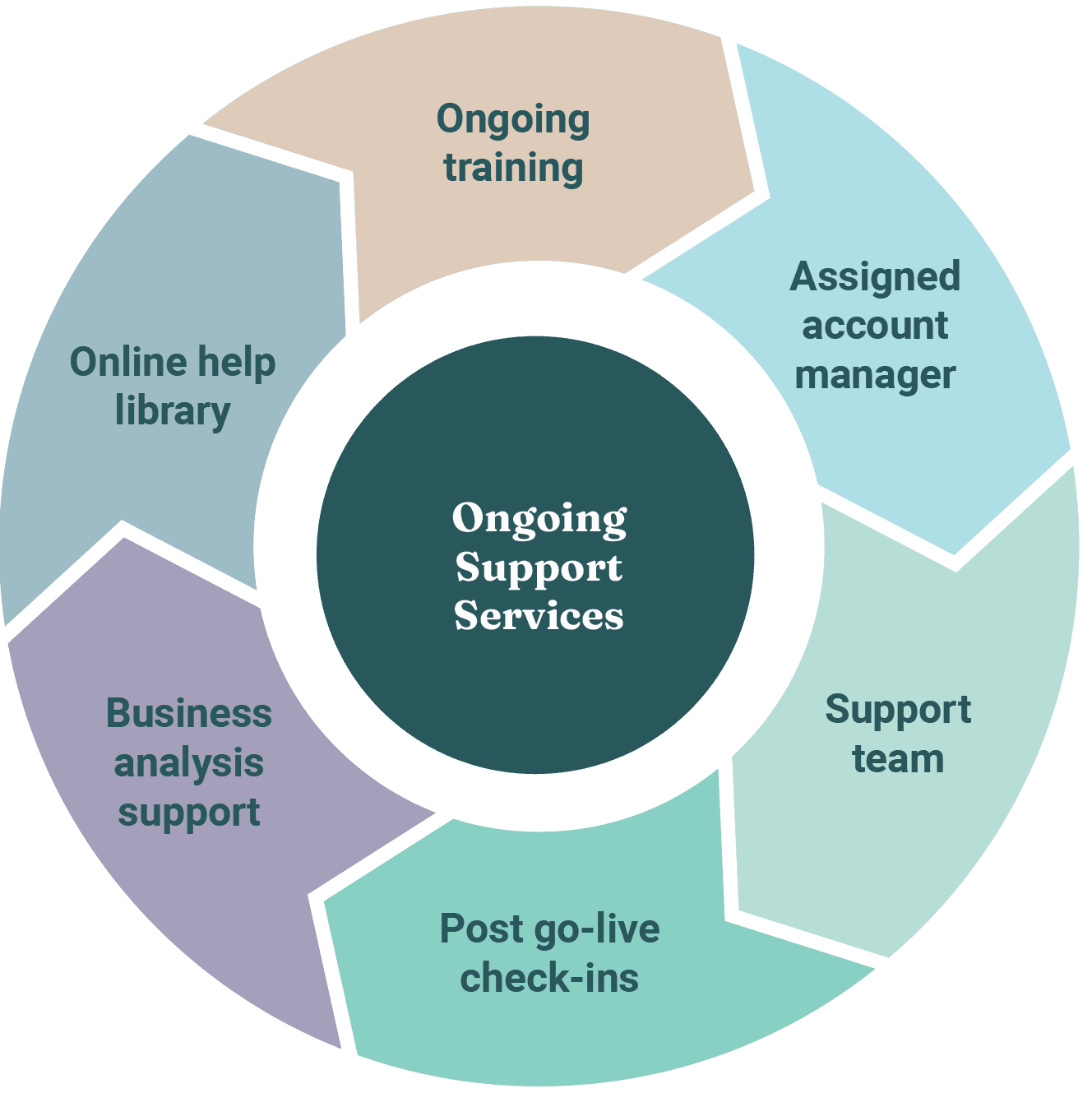
Implementation features and benefits
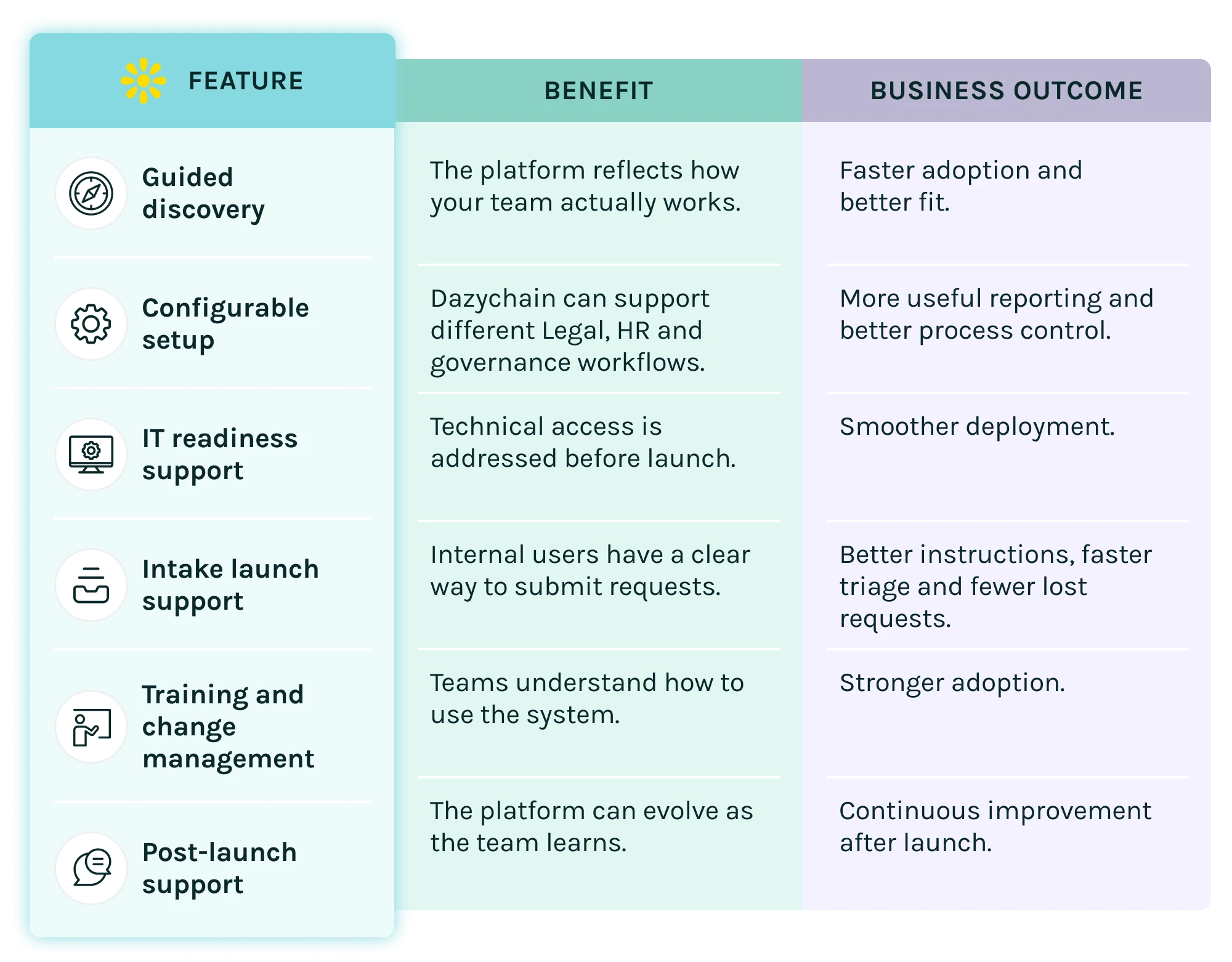
Business outcomes
Adoption maturity ladder
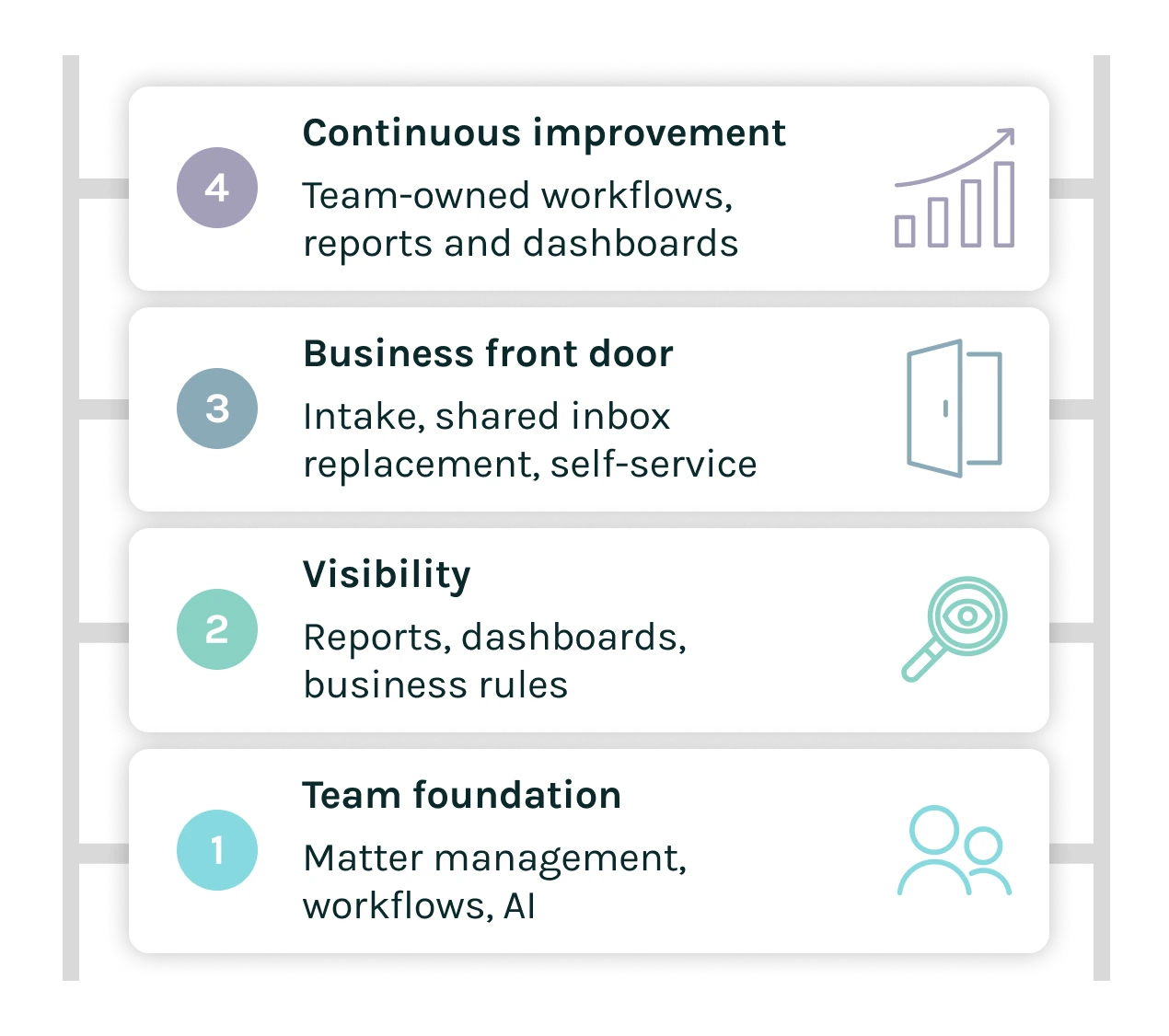
Adoption Maturity Ladder: a practical path to deeper Dazychain adoption over time.
In short
Dazychain implementation is a guided configuration and launch process for Legal and HR matter management. It typically includes discovery, configuration, IT readiness, integrations, training, go-live and support. Dazychain can be configured around folders, matter types, case types, intake forms, custom fields, risk ratings, document types, statuses, user groups, permissions, workflows and reporting. Implementation is designed to help teams launch quickly, adopt confidently and continue improving after go-live.

Common Starting Points for Dazychain
Start with the Team. Then Scale to the Business.
Start where the value is clearest, then expand
Dazychain does not need to be rolled out everywhere at once. Many teams start by using Dazychain internally for matter management, AI and reporting. Once the team is confident, they introduce intake, replace shared inboxes and spreadsheets, add automation, enable self-service and learn to configure workflows, reports and dashboards themselves. This staged approach helps Legal and HR teams build confidence, prove value and scale adoption safely.
The recommended adoption model – start with the team first
The strongest starting point is usually the team itself. Before opening Dazychain to the wider organisation, Legal or HR teams can begin by using Dazychain internally to manage their own matters, cases, documents, workflows and reporting. This lets the team:
Then Dazychain can be rolled out more widely.
Legal starting pathway
1
Start with legal matter management
Begin by introducing Dazychain to the Legal team as the central place to manage legal matters. The first stage can include a range of core legal workflows, such as:
This gives the Legal team a working operating system before asking internal clients to change how they request legal support.
2
Enable AI from the beginning
AI should be available early, not treated as a later add-on. The Legal team can begin using AI for:
This helps the team see immediate productivity value while learning how AI fits into matter management. The key point is that AI outputs can be saved with the matter or document, making them reusable and part of the legal record rather than one-off individual outputs.
3
Introduce key reports and dashboards
Once the team is managing matters in Dazychain, the next step is reporting. Start with practical dashboards that show:
This gives General Counsel and Legal Operations early visibility and helps prove value.
4
Introduce legal intake
Once the Legal team is confident, introduce legal intake for internal clients. This gives the business a clear front door for legal support. Internal clients can submit structured requests, attach documents and provide the information Legal needs from the start. Legal intake can be introduced for:
5
Replace shared inboxes and spreadsheets
After legal intake is working, Dazychain can progressively replace shared inboxes and manual trackers. Instead of managing requests through email and spreadsheets, the Legal team can manage work through:
This is where the operating model changes.
6
Introduce contract automation
For contract workflows, Legal teams can move from manual drafting to self-serve contract automation. Contract document management can help track:
This reduces manual drafting and allows Legal to focus on higher-value work.
7
Introduce internal client self-service
Internal client self-service can then expand the value of Dazychain beyond the Legal team. Business users can:
This improves the internal client experience and reduces administrative load on Legal.
8
Train the Legal team to configure and improve Dazychain
The final maturity stage is enabling the Legal team to update parts of the system themselves. With the right training and governance, the team can learn to create or refine:
This turns Dazychain from an implemented system into a continuous improvement platform for Legal Operations.
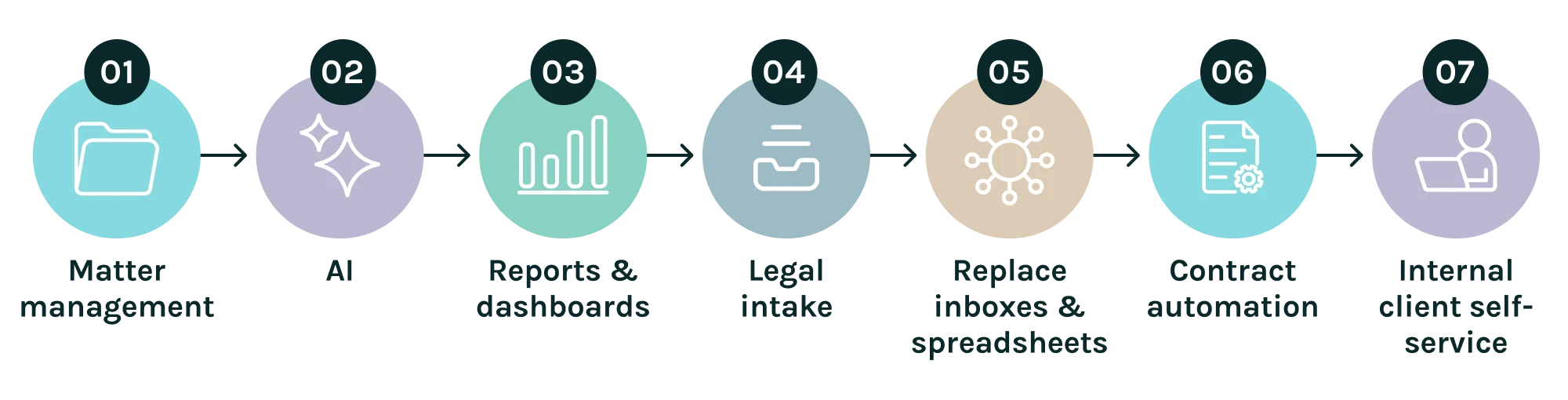
Legal Rollout Pathway: a staged path to a more connected, efficient legal team.
HR starting pathway
1
Start with HR matter management
Begin by introducing Dazychain HR to the HR team as the central place to manage employee matters. The first stage can include a range of core HR workflows, such as:
2
Enable AI from the beginning
AI should be available early for HR as well. HR teams can begin using AI for:
This helps HR users save time while keeping AI connected to the relevant matter or document.
3
Introduce key reports and dashboards
Once the HR team is managing matters in Dazychain, introduce practical dashboards. Start with reports that show:
This gives HR Directors, HR Operations and Employee Relations leaders better visibility over workload and people risk.
4
Introduce HR intake
Once the HR team is confident, introduce HR intake for internal clients. Employees and managers can submit structured HR requests rather than relying on scattered emails and informal messages. HR intake can be introduced for:
5
Replace shared inboxes and spreadsheets
After HR intake is working, Dazychain can progressively replace shared HR inboxes, manual case trackers and spreadsheets. Instead of managing HR matters through email and personal notes, the HR team can manage work through:
6
Introduce document automation
Introduce HR document automation using employee and case data to automatically generate employment contracts, letters from templates, or PIPs. HR automation could include:
This gives HR a practical automation pathway without making it sound too legally narrow.
7
Introduce internal client self-service
Internal client self-service can then expand Dazychain HR to employees and managers. Employees and managers can:
This improves HR service delivery while keeping sensitive matters controlled.
8
Train the HR team to configure and improve Dazychain
The final maturity stage is enabling HR administrators or operations users to update and improve the system themselves. With appropriate governance, the HR team can learn to create or refine:
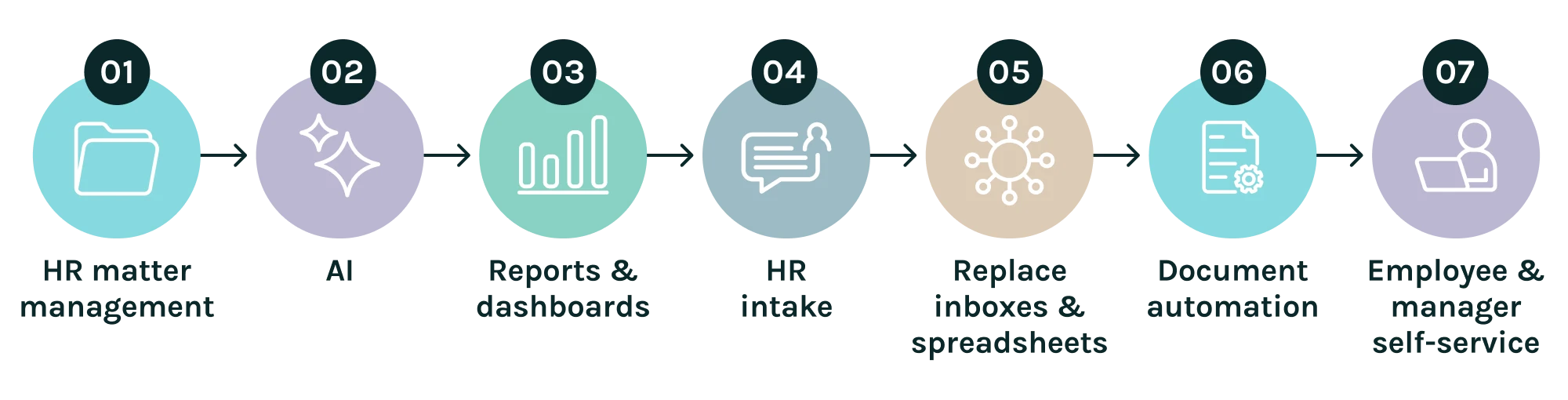
HR Rollout Pathway: a staged path to a more connected, efficient HR team.
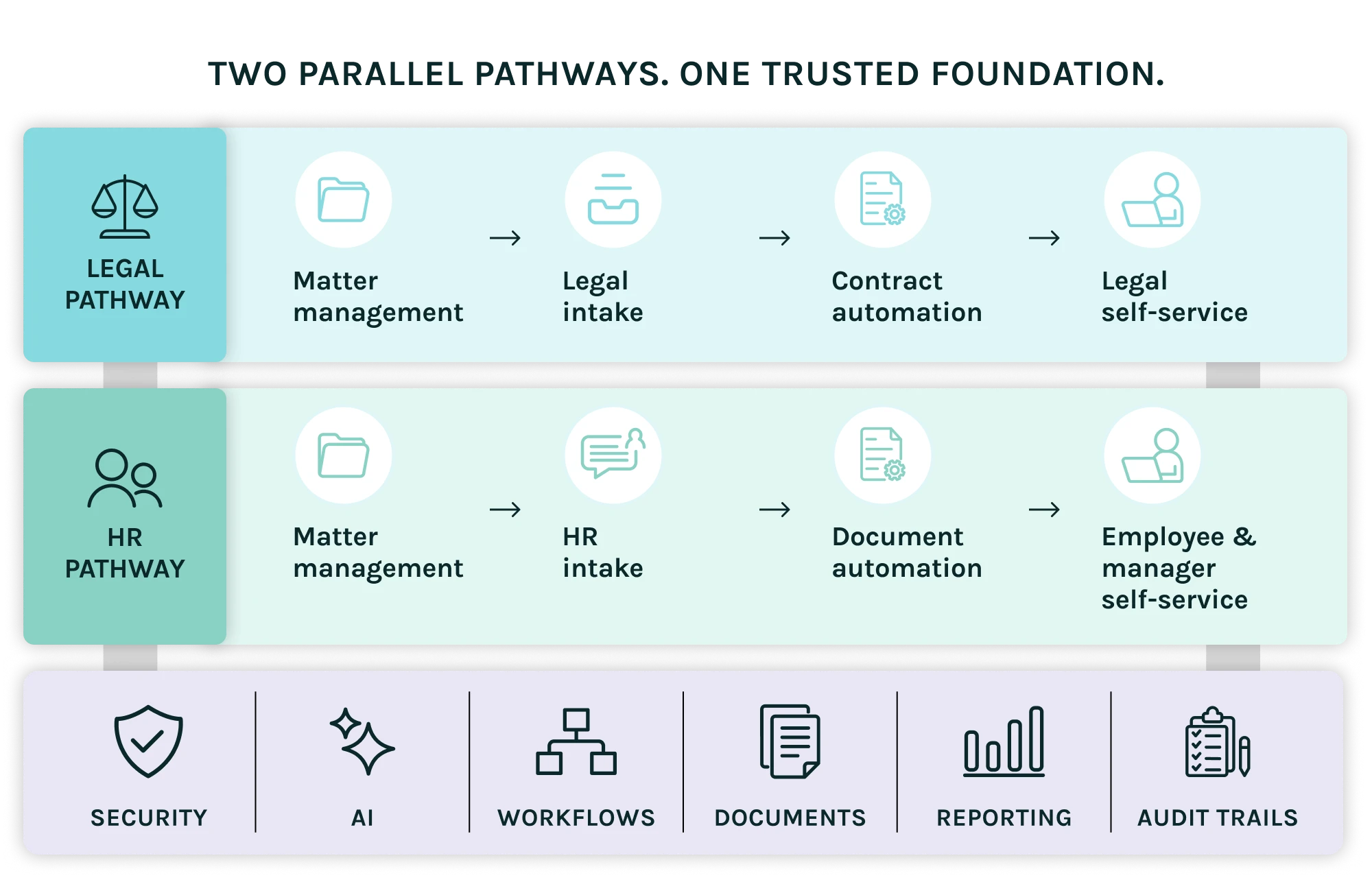
In short
Dazychain can be adopted through staged starting points for Legal and HR teams. Legal teams often start with legal matter management, AI and reporting, then introduce legal intake, replace shared inboxes and spreadsheets, add contract automation, enable internal client self-service and learn to configure workflows and dashboards. HR teams often start with HR matter management, AI and reporting, then introduce HR intake, replace shared inboxes and spreadsheets, add HR document automation, enable employee and manager self-service and learn to configure workflows and dashboards.
Frequently asked questions about implementing Dazychain
Dazychain seamlessly integrates with a range of software and systems – see our Integrations page for details. We work with your team to ensure Dazychain reflects and builds on existing systems and workflows.
Dazychain provides comprehensive training and support throughout onboarding and beyond, complemented by our free library of online learning, resources, webinars, your account manager and our technical team.
Training of new staff, refreshers, and upskilling for existing staff is included.
All your existing legal matter data can be migrated to Dazychain. We’re happy to provide a quote.
Our Support Team is available 24/7/365 through our Help Desk at: https://dazychainsupport.zendesk.com/hc/en-us/requests/new
Check out our Case Studies page for details.
Dazychain provides structured guidance and support throughout the rollout process, including business discovery session, configuration reviews, training sessions, documentation, and best-practice recommendations. We work closely with your team to ensure smooth adoption and alignment with existing workflows.
Good adoption is reflected in consistent use of the platform across your legal team, timely matter updates, and reduced reliance on email or spreadsheets for matter management. Adoption can be measured through platform analytics, such as active users, matter creation rates, and task completion metrics.
Yes. We provide tailored onboarding for business users, ensuring that non-legal requestors can easily submit requests, track progress, and interact with the system efficiently, without needing legal expertise.