Email Management
Inbox management for Legal teams, and other high-volume teams
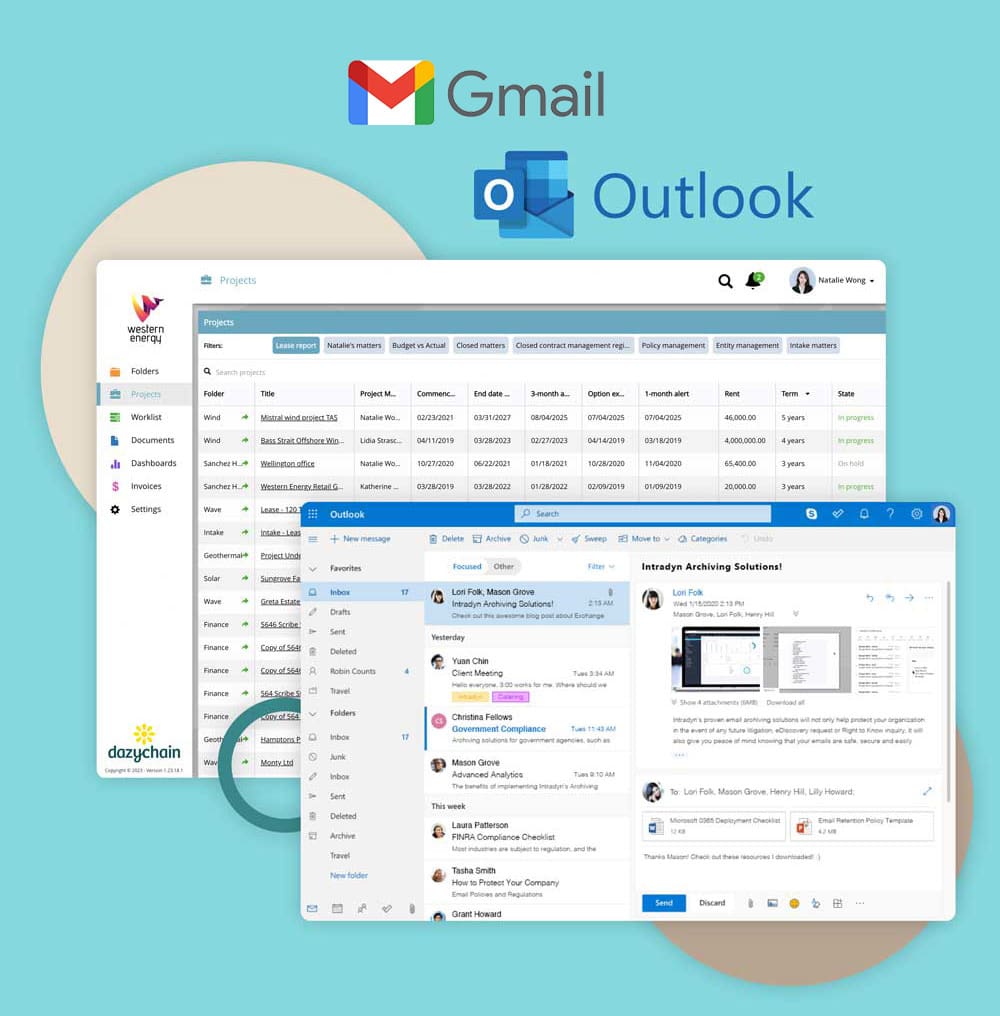
Gmail and Outlook integrations. Drag and drop. Automated.
Email work still lives in the inbox, but unmanaged email messages create risk: lost attachments, fragmented work history, and key decisions trapped in personal email.
Dazychain turns day-to-day email communication into a structured record linked to the right work item, so incoming messages can be filed, found and governed in one place. Create a matter (project) from an email, file selected email messages and attachments to the right matter, and keep correspondence searchable for the whole team with permissioned access.

Highly rated by legal teams using Dazychain to centralize and manage their legal matters.
Bringing agility and innovation to your legal inbox
Dazychain helps in-house teams keep an organized inbox without changing how lawyers work. Instead of relying on forwarding chains, “FYI” emails, or someone’s appropriate folders, you connect relevant communications directly to the matter, so the right people can access the full context when they need it. It becomes easy and effective email management that will save you more than a few minutes every day.
In Dazychain, emails are automatically linked to the relevant legal matter, so your team can track conversations, documents, and decisions in one place within the legal matter management system.
When your legal inbox is structured around matters, it becomes easier to keep your inbox tidy, reduce duplicate chasing, and respond faster, because the information isn’t scattered across multiple inboxes and mailboxes.
Centralized email and document storage
When email messages stay in personal inboxes, the matter file becomes incomplete. Dazychain centralises correspondence so each matter contains the emails, attachments, and decisions that belong to it, not just what someone remembered to save.
This also protects team continuity. If someone is on leave or leaves the business, the matter still retains the complete email communication history and supporting documents.
Improve productivity
A well-organized inbox with centralized storage for all legal matters helps you save crucial work hours so that the team has time to focus on more strategic matters.
Fast information retrieval, reduced clutter, more efficient communication, and workflow automation can all help to improve productivity and job satisfaction.
“Now if I get an email, I save it and it’s done. I don’t have to think about it. And it means I can find it when I need it.”
Mercia Chapman
Senior Legal Counsel
Equity Trustees
How inbox management works in Dazychain
Capture incoming messages in context
When a key email arrives, you can connect it to the matter it belongs to — so it’s stored with the right documents, stakeholders, and decisions.
- File a selected email to an existing matter
- Save attachments with the matter record
- Preserve the subject line and key metadata for search and reporting
Note: Dazychain files selected emails (not full threads by default).
Create a matter from an email – fast intake
Turn an email into a matter when something becomes a task – like a contract request, a dispute escalation, or a regulatory query.
When you create a matter from an email, the system captures the email details automatically (sender, recipients, subject line, date/time, and attachments), and the user confirms what should be filed and where.
For higher-volume legal requests, teams often use legal intake and triage software to standardise how work enters the legal department.
Keep your inbox space under control
A busy inbox gets overloaded fast. With matter-based filing, you can reduce inbox noise while keeping a complete record where it belongs.
- Reduce inbox clutter by filing the messages that matter.
- Maintain an audit trail of what was filed, and by who.
- Make handovers easier because the matter record stays complete.
Search and retrieve faster
When email is stored against matters, you can find what you need without scrolling through old threads.
- Search by matter, sender, keywords and subject line
- Access attachments directly from the matter (no need to open the original email first)
- Search text across both filed emails and filed attachments (e.g., PDFs/Word document
Gmail inbox management
If your legal team runs on Gmail, Dazychain helps you manage incoming messages as part of the matter record, so correspondence and attachments don’t live forever in personal email.
- Gmail integration is delivered via a Gmail add-on
- Supports direct inboxes (not shared inboxes / delegated access)
- Create matters from Gmail emails (email details captured automatically)
- File selected emails and attachments to existing matters by searching for the matter and filing
- Filed items are copied into Dazychain, permissioned by matter access, with audit trail
- No Gmail label/folder mapping, and selected emails only (not full threads)
Outlook inbox management
Dazychain supports Outlook users who want to keep email messages connected to matters without rebuilding their whole workflow.
- Outlook integration is delivered via a Microsoft add-in
- Supports shared mailboxes
- Create matters from Outlook emails (email details captured automatically)
- File selected emails and attachments to the correct matter by searching and filing
- Filed items are copied into Dazychain, permissioned by matter access, with audit trail
Keep matters consistent with rules, folders and templates
A big part of managing email is consistency, not just filing. Dazychain can support a more consistent approach by using create rules, appropriate folders, and create templates so matters are organised the same way each time.
Onboarding can help you set up an appropriate folder system, create folders and create templates for common workflows. While DazychainAI doesn’t automatically sort every email in the background, it can recommend the most relevant matter and provide filing suggestions when you file selected messages.
What gets stored when you file an email
When you file an email message to a matter, Dazychain can capture the information you need for traceability and retrieval, such as:
- The email message content
- Sender / recipients and timestamp
- Subject line
- Attachments (and related documents)
Dazychain files selected emails (rather than automatically capturing entire threads).
Secure and trusted
Dazychain in-house matter management and legal documentation software uses the latest technologies to protect your data and comply with government and industry regulations.



Take control of your inbox
Inbox management isn’t just “tidiness”, it’s risk reduction, speed, and continuity.
Dazychain helps legal teams keep an inbox organized, manage incoming messages with less manual effort, and maintain a complete matter record that’s searchable and permissioned.
Frequently asked questions about effective inbox management in Dazychain
Inbox management is the process of keeping email communication organised, searchable, and connected to matters (projects), so teams can retrieve context quickly and reduce reliance on personal email archives.
Yes. You can create a new matter (project) from an email. Email details are captured automatically (sender, recipients, subject line, date/time, attachments), and the user confirms what should be filed and where.
Yes. From the add-in/add-on you can search for the relevant matter, then file the selected email and its attachments. It’s fastest when you don’t need to rename attachments.
Yes. Dazychain supports both Outlook (Microsoft add-in) and Gmail (Gmail add-on). Gmail is supported for direct inboxes only.
Outlook supports shared mailboxes. Gmail does not support shared inboxes or delegated access.
No. Dazychain files selected emails rather than full email threads by default.
Yes. You can search email content and the content of filed attachments (e.g., PDFs and Word documents).
Filed emails and attachments are copied into Dazychain and permissioned by matter access, so only authorised users can view sensitive communications. Filing activity is tracked with audit trail.
Because key emails and attachments are stored against matters (not just personal inboxes), the matter history remains available for continuity and auditability.
For Microsoft 365, administrators typically authorise security permissions and approve tenant-wide consent (via an admin consent link). For Gmail, users grant the required permissions for the Gmail add-on, and depending on organisational security settings, an administrator may also need to approve permissions.